SPF, DKIM and DMARC in plain words
Three checks decide whether a message really came from the domain it claims. Learn what each one answers, using the ndwtech.org setup as a live example, and why "passed" is not the same as "safe".
The problem these three solve
Email was designed in a time when nobody imagined anyone would lie about who they were. Anyone can type training@ndwtech.org into the From line of a message. SPF, DKIM and DMARC are the add-ons that let a receiving mail server check whether a message really came from the domain it claims.
You do not need to set them up. You need to know what they mean when you see “PASS” or “FAIL” in a message’s security details, and what they cannot tell you.
The three checks, one sentence each
| Check | Plain-words meaning | The question it answers |
|---|---|---|
| SPF | A guest list. The domain owner publishes which mail services are allowed to send for it. | Did this come from a server on the list? |
| DKIM | A tamper-evident seal. The sending service signs the message with a key that the domain owner has published. | Was it signed by the domain, and is it unchanged since? |
| DMARC | The domain owner’s instructions to receivers. “If SPF or DKIM don’t line up with my domain, do this: nothing, quarantine, or reject. And send me a report.” | Does the From domain match what passed, and what should happen if not? |
The word that ties them together is alignment. SPF and DKIM each pass for some domain. DMARC checks that this domain is the same one shown in the From line. Without alignment, a scammer could pass SPF for their own junk domain and still display your bank’s name.
If you would like to hear the three checks explained once more, security educator Mike Chapple does it in six minutes.
A live example: ndwtech.org
The emails from this training platform come from training@ndwtech.org. Here is how the three checks work for that domain, in plain words.
- SPF: ndwtech.org publishes a list that names the services allowed to send for it: Google Workspace, which staff use for day-to-day mail, and the transactional mail service that sends automated training messages such as invitations and certificates. A message claiming to be from ndwtech.org but sent from some other server fails SPF.
- DKIM: both services sign outgoing messages with keys published under ndwtech.org. So the seal says “ndwtech.org”, not the name of the mail service. That is what makes the signature align with the From address.
- DMARC: ndwtech.org tells receivers to reject messages that fail alignment, and to send it reports about any attempts. If someone sends a forged message “from”
training@ndwtech.org, Gmail or Outlook should refuse it or drop it into spam.
The same three steps as a picture of what happens when a message from training@ndwtech.org arrives.
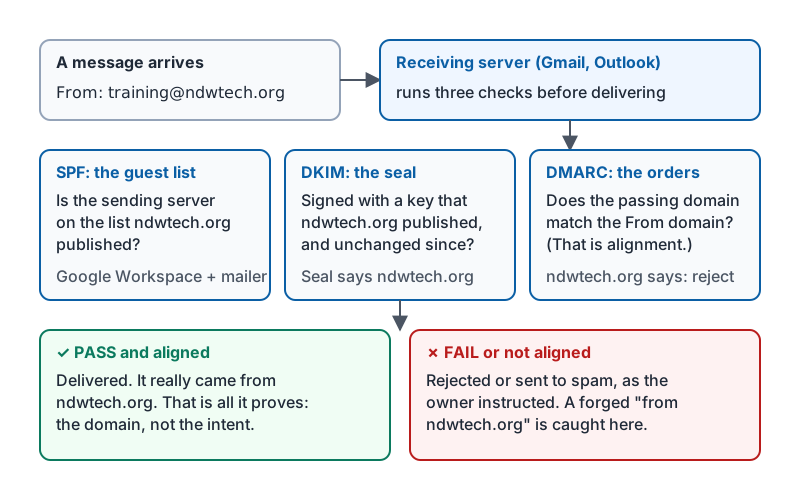
When you open a genuine message from training@ndwtech.org, the security details should show it was signed by ndwtech.org and that the sender is on the list. The screen wording differs by app; the card below shows where to look.
Why “passed” is not the same as “safe”
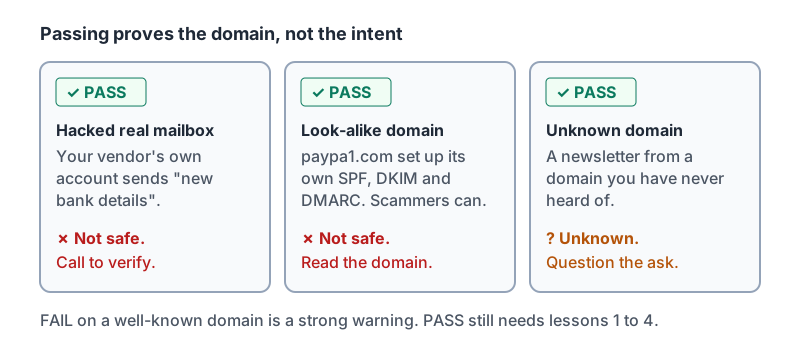
This is the part people get wrong. All three checks passing means the message really came from the domain in the From line. That is all.
| Situation | Checks | Safe? |
|---|---|---|
| Your vendor’s real mailbox was hacked and sends you new bank details | PASS | No. The domain is real; the person behind the keyboard is not. |
help@paypa1.com sets up SPF, DKIM and DMARC for paypa1.com |
PASS | No. Scammers can authenticate their own look-alike domains perfectly. |
| A newsletter from a domain you have never heard of | PASS | Unknown. Authentication says nothing about intent. |
| A genuine message from your bank relayed through an old forwarding rule | FAIL | Possibly safe, but treat with care. Failures happen on real mail too. |
| A message “from” your company domain sent from an unknown server | FAIL | Treat as spoofed. This is exactly what the checks exist to catch. |
So the checks are a floor, not a ceiling:
- FAIL on a message that claims a well-known domain is a strong warning. Report it.
- PASS means you still have to do everything in lessons 1 to 4: read the domain, check the links, question the request.
Three messages that pass every check and still deserve suspicion.
Why your business should care
If your company’s domain does not have these three set up, criminals can send mail “from” your address to your customers and vendors and it will often land in their inboxes. That is how the “vendor bank change” scam reaches your customers with your name on it. Ask whoever manages your email whether your domain has SPF, DKIM and a DMARC policy of quarantine or reject. It is a short job for them and it protects your reputation.
Try it now
Find the enrollment email for this course from training@ndwtech.org. Open the sender details and find the signed-by information. Then find a marketing email from any other company and compare. Which one is aligned?
Remember: SPF is the guest list, DKIM is the seal, DMARC is the owner’s instructions. Passing proves the domain, not the intent. A look-alike domain can pass every check.
Checking your progress…