Business email compromise and payment-change requests
The most expensive scams carry no link and no attachment, just a convincing request. Learn the patterns and the one rule that beats them.
No malware, just a request
Business email compromise (BEC) is a message that pretends to be someone you trust and asks you to move money or hand over data. There is nothing to click and nothing to download, so filters rarely stop it. Year after year it is the most costly type of cybercrime reported to the FBI, and small businesses are the favorite target because one person often handles payments end to end.
The sender might be a look-alike address, or it might be the real account of a vendor or coworker that has been taken over. That is why reading the address is necessary but not enough.
The FBI, which tracks these losses, summarizes the scam in just over a minute.
The five common shapes
| Pattern | What it looks like | The tell |
|---|---|---|
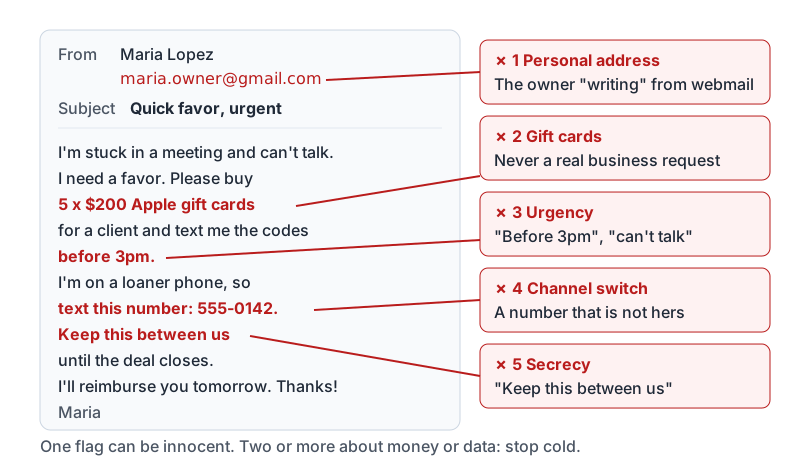
| Executive request | “I’m in a meeting, need you to buy gift cards for a client and send me the codes” | Secrecy, speed, gift cards or wire, and a request to switch to text or a personal number |
| Vendor bank change | “We’ve changed banks. Please use the new account for the attached invoice” | Payment details change by email, often right before a big invoice |
| Payroll diversion | An employee “asks HR” to update their direct deposit to a new account | Sent from a personal address or a newly created look-alike |
| Invoice from a known thread | A real email thread with your supplier suddenly contains new bank details | The supplier’s mailbox was compromised; everything looks genuine |
| Data request | “Send me the W-2s / customer list / employee phone numbers today” | Authority plus urgency, no business reason given |
Red flags that stack up
One of these alone can be innocent. Two or more in a message about money or data should stop you cold.
- Urgency: “before 3pm”, “today”, “the deal falls through”.
- Secrecy: “keep this between us”, “don’t tell the team yet”.
- Authority: the owner, the CEO, a lawyer, the bank.
- Channel switch: “text me at this number”, “don’t call, I’m in a meeting”.
- New payment details: a new bank, a new payment app, gift cards, crypto.
- Personal address: the boss writing from a webmail account “because the work one is down”.
- Slightly off tone: a casual boss suddenly formal, or the other way around, odd signature, missing nickname.
Here is a typical gift-card request with the flags marked. Count how many stack up in six lines.
The second-channel rule
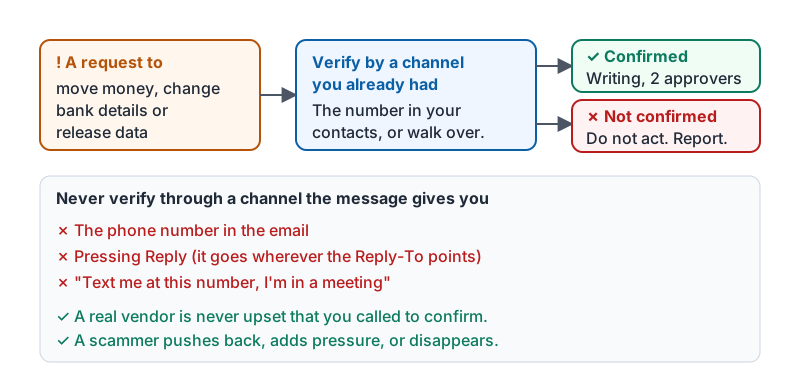
Verify any request to move money, change payment details or release data through a channel you already have, never through one the message gives you.
- Call the vendor on the number in your records or on their invoices from last year, not the number in the email.
- Walk over to your boss, or call the number in your phone that you have called before.
- If you must email, start a new message to the address you already have on file. Do not reply, because a reply goes to whoever set the Reply-To.
A genuine vendor will never be upset that you called to confirm a bank change. A scammer will push back, add pressure, or disappear.
The whole rule fits in one diagram.
Your process is your permission to slow down
Good businesses write this down so that nobody has to be brave in the moment:
- Payment detail changes are always confirmed by phone on a known number and in writing from a known contact.
- Changes above a set amount need two people to approve.
- Gift cards are never a business purchase requested by email or text.
- Anyone can pause a payment to verify, and nobody is ever blamed for checking.
If your workplace does not have these rules yet, the first three lines of this list are a good start. Share them with whoever runs payments.
An example, start to finish
From: Gulf Coast Supply Accounts
<accounts@gulfcoastsupply.com>Subject: Updated remittance information Please update our bank account for all future payments. Details attached. Our next invoice of $12,400 is due Friday.
The address is the vendor’s real domain, so this may be a compromised mailbox. The right sequence:
- Do not change anything in the payment system yet.
- Call Gulf Coast Supply on the number already in your records.
- If they confirm, get the change in writing from a known contact and have a second person approve.
- Tell your manager and IT about the email either way. If it was fake, the vendor needs to know their mailbox was compromised.
Try it now
Open your contacts and find the phone number you would use to verify a payment change with your most important vendor and with your manager. If you do not have one, get it this week, before you need it.
Remember: anyone asking you to move money or data gets verified through a channel you already had. Urgency and secrecy are the scam’s engine, and a phone call stalls it.
Checking your progress…