Links, QR codes and attachments
The text of a link is a label, not a destination. Learn to see where links, QR codes and attachments really go before you open them.
A link has two parts
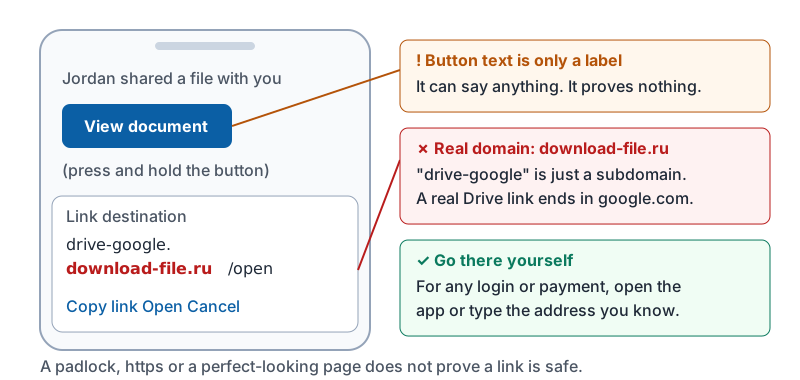
What you see (Pay invoice, View document, even https://paypal.com) is just a label. Where you actually go is the destination, and the two can be completely different. Phishing depends on you trusting the label.
The skill: reveal the destination, then read its domain from the right, exactly as you did for sender addresses.
| Label | Destination | Verdict |
|---|---|---|
| Open in Drive | https://drive.google.com/file/... |
Genuine Google domain |
| Open in Drive | http://drive-google.download-file.ru/open |
The real domain is download-file.ru |
https://chase.com/login |
https://chase.com.verify-account.co/login |
Real domain is verify-account.co |
| Reset password | https://yourcompany-reset.com/login |
Hyphenated copy of your company’s name |
Things that do not prove a link is safe: a padlock, “https”, the company’s logo on the page, or the page looking exactly like the real login screen. Copying a login page takes a criminal about a minute.
On a phone, press and hold the button to see where it really goes.
Shortened links
Links like bit.ly/3xYz or tinyurl.com/... hide the destination on purpose. Businesses use them in marketing; attackers use them in phishing. If a message asking you to log in or pay uses a shortener, treat that as a reason to go to the website yourself instead of using the link.
The “go there yourself” rule
For anything involving a password or payment, do not use the link at all. Open your browser or the company’s app and type the address you already know, or use the bookmark you already have. If the alert was real, it will be waiting for you inside the account. This single habit defeats almost all credential phishing.
QR codes
A QR code is a link you cannot read. Attackers now put QR codes inside emails (“scan to view your secure document”) because email filters that scan links often ignore images. They also paste stickers over real QR codes on parking meters, menus and posters.
- When you scan a code, your phone shows a preview of the destination before it opens. Read the domain in that preview.
- A QR code in an email asking you to log in or pay is a red flag by itself. Legitimate services send a link you can inspect.
- Never type a password on a page you reached from a QR code in an email. Go there yourself instead.
Attachments
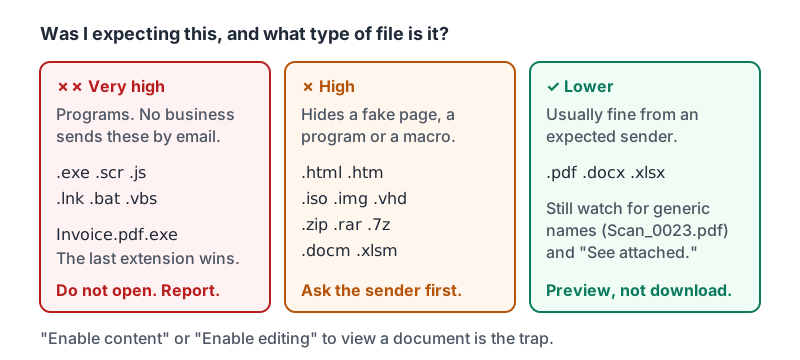
Ask two questions before you open any attachment: was I expecting this from this person, and what type of file is it?
| File type | Risk | Why |
|---|---|---|
.html, .htm |
High | Opens a fake login page right on your device, with no website for filters to block |
.iso, .img, .vhd |
High | Disk images that hide programs from scanners |
.zip, .rar, .7z |
High | Often contain a program disguised as a document, sometimes password-protected so scanners cannot look inside |
.docm, .xlsm, .pptm |
High | Office files with macros (small programs). “Enable content” or “Enable editing” to view is the trap |
.exe, .scr, .js, .lnk, .bat, .vbs |
Very high | Programs. No business sends these by email |
Invoice.pdf.exe |
Very high | Double extension. The last one wins: it is a program |
.pdf, .docx, .xlsx |
Lower | Usually fine from expected senders, but can still contain dangerous links |
Two more signs:
- A generic file name (
Document.pdf,Scan_0023.zip) from someone who would normally name their files. - A message whose entire point is the attachment, with no real text (“See attached.”).
The file types from the table, sorted into three piles.
When in doubt, use the preview inside your mail app rather than downloading, and ask the sender through a channel you already trust whether they sent it.
Try it now
Find an email with a button or link in it, such as a receipt or a notification. On your phone, press and hold the link and read the destination domain out loud. Then open one attachment you were expecting with the preview rather than a download. You now know the two gestures that matter most.
Remember: labels lie, destinations do not. Reveal the destination, read the domain from the right, and for anything involving a login or payment, go there yourself instead.
Checking your progress…