File names that sort themselves
Date first, then who, then what, then a version. Never "final".
Why names matter when search exists
Search finds files by words inside them, which is powerful, but a list of search results all called “Invoice” still makes you open each one. A good name tells you what a file is from the list, sorts into order on its own, and still makes sense after it is downloaded and emailed.
The pattern
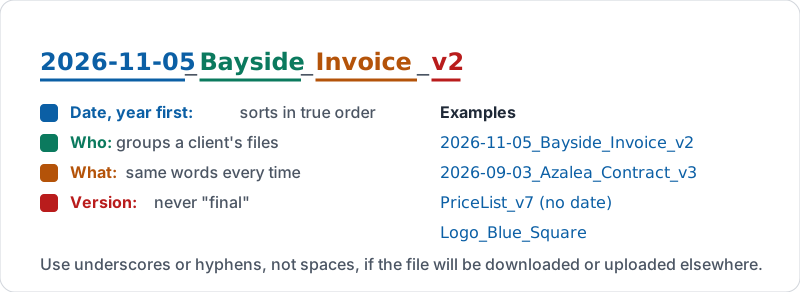
YYYY-MM-DD_Client_Document_v#
| Part | Example | Why this way |
|---|---|---|
| Date, year first | 2026-11-05 | Sorts in true date order; 11/5/26 does not |
| Who it is about | Bayside | Groups a client’s files together in search |
| What it is | Invoice, Proposal, Contract | One or two words, same words every time |
| Version | v1, v2, v3 | Never “final”, “FINAL2” or “new”; there is always a later one |
Examples: 2026-11-05_Bayside_Invoice_v2, 2026-09-03_Azalea_Contract_v3, 2026-12-01_Menu_Winter_v4.
Use underscores or hyphens rather than spaces if the file will be downloaded or uploaded to other systems; some of them mangle spaces.
The pattern, part by part.
When a date does not fit
Some files are not about a date: the price list, the brand logo, the employee handbook. Drop the date and keep the rest: PriceList_v7, Logo_Blue_Square, Handbook_v12. Version history (Docs lesson 6) tracks the small edits inside a Google Doc; the version number in the name is for the big releases you want to see from the list.
Rename, do not duplicate
When a document reaches a new milestone, rename it to bump the version number rather than making a copy. One file, one history. Copies are for genuinely new documents (next year’s proposal based on this year’s).
The “final” problem
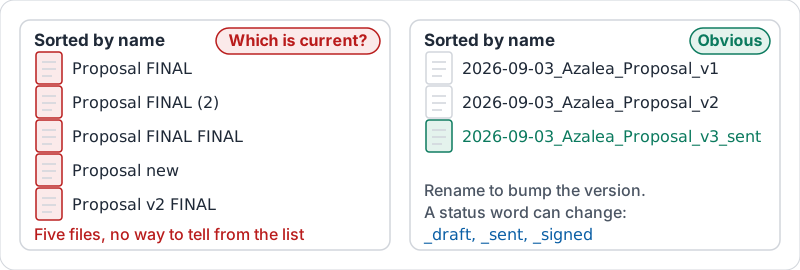
“Final” is a promise the file cannot keep. The moment someone finds a typo there is “Final v2” and “FINAL FINAL”. Use a version number and, if it helps, a status word that can change: _draft, _sent, _signed.
Two folders sorted by name.
Try it now
Open a folder with at least ten files. Rename the five worst names using the pattern. Notice how the folder sorts afterwards.
Remember: date first, who, what, version number. If you are about to type “final”, type “v2” instead.
Checking your progress…