Folders that make sense to the next person
A folder structure is for the person who did not create it. Few levels, predictable names, one place for each thing.
Design for the newest colleague
You know where your files are. The test of a folder structure is whether someone who started on Monday can find the signed contract for a client without asking. Three principles get you most of the way:
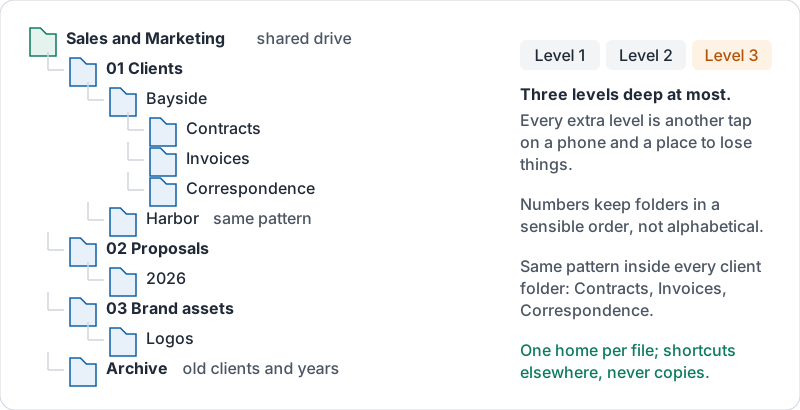
- Shallow. Three levels deep at most. Every extra level is another click on a phone and another place to lose things.
- Predictable. The same pattern inside every folder of the same kind. If “Clients / Bayside” has Contracts, Invoices and Correspondence, so does “Clients / Harbor”.
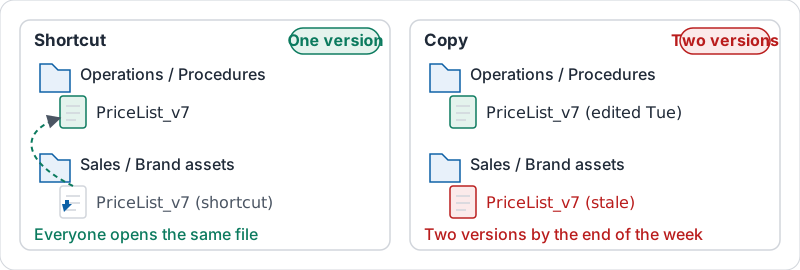
- One home per thing. A file lives in exactly one folder. Shortcuts can point to it from elsewhere; copies drift.
A pattern that works for most small businesses
| Level 1 (shared drive) | Level 2 | Level 3 |
|---|---|---|
| Sales and Marketing | Clients | One folder per client |
| Proposals | By year | |
| Brand assets | Logos, Photos, Templates | |
| Operations | Procedures | By area |
| Suppliers | One folder per supplier | |
| Finance (restricted) | Invoices | By year, then month |
| Payroll | By year |
Numbering folders (“01 Clients”, “02 Proposals”) keeps them in a sensible order rather than alphabetical.
That pattern as a tree, with the three-level limit marked.
Archive, do not delete
When a client leaves or a year ends, move the folder into an Archive folder at the same level. The structure stays tidy, nothing is lost, and search still finds it. Deleting is for genuine duplicates and junk.
Shortcuts instead of copies
If the same file is needed in two places, keep it in its home and add a shortcut in the other folder. Everyone opens the same file, and there is one version. A copy in each place is two versions by the end of the week.
Shortcut or copy.
Clean-ups that pay off
- A folder called “Misc”, “Other” or “New folder” is a to-do item. Sort it or archive it.
- A folder with 200 files in it needs sub-folders by year or client.
- Files that sit loose in the top level of a shared drive belong in a folder.
Try it now
Open your team’s busiest shared drive. Find one folder that breaks a principle above (too deep, a “Misc”, loose files at the top). Fix that one folder and post a line in the team chat saying what moved where.
Remember: shallow, predictable, one home per file. If the newest colleague cannot find it, the structure is wrong, not the colleague.
Checking your progress…