Prompting Gemini well
The answer is only as good as the brief. Four parts to a good prompt, and one change per follow-up.
The brief is the work
“Write an email to a customer about a delay” gives you a generic note that mentions nothing specific. Gemini is not bad at emails. It was told nothing.
Think of Gemini as a capable new colleague on day one: skilled, and completely unaware of your business, your customer and what happened last week. Your prompt is the handover.
Four parts of a good prompt
| Part | Question it answers | Example |
|---|---|---|
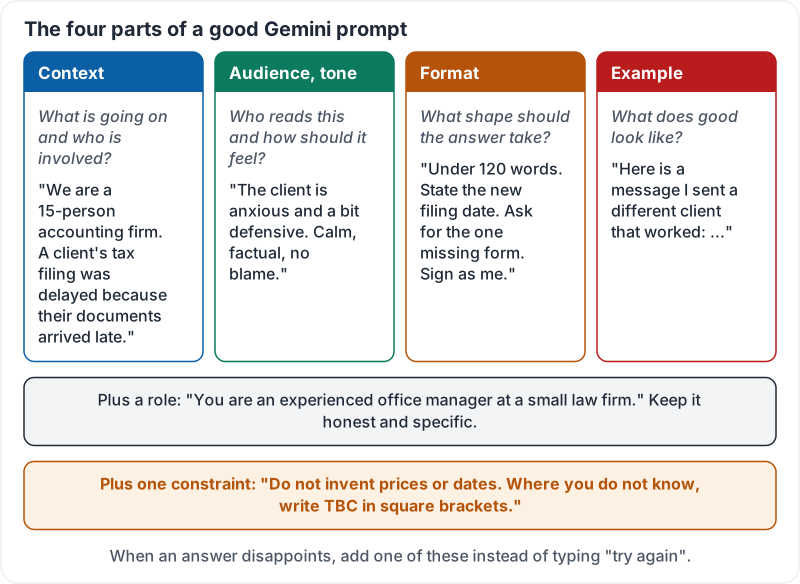
| Context | What is going on and who is involved? | “We are a 15-person accounting firm. A client’s tax filing was delayed because their documents arrived late.” |
| Audience and tone | Who reads this and how should it feel? | “The client is anxious and a bit defensive. Calm, factual, no blame.” |
| Format | What shape should the answer take? | “Under 120 words. State the new filing date. Ask for the one missing form. Sign as me.” |
| Example | What does good look like? | “Here is a message I sent a different client that worked: …” |
You do not need all four every time. But when an answer disappoints, the fix is to add one, not to type “try again”. Gemini has no new information to work with when you simply repeat the ask.
Role and constraints
A role focuses the answer: “You are an experienced office manager at a small law firm.” Keep it honest and specific.
A constraint prevents the worst mistakes: “Do not invent prices or dates. Where you do not know, write TBC in square brackets.” One sentence, large payoff.
The four parts, the role and the constraint in one picture:
Show it, don’t describe it
One pasted example beats three sentences of description. Want product descriptions in your voice? Paste two you like and say “match this”. Want a certain table layout? Paste one row.
Prompting in the side panel
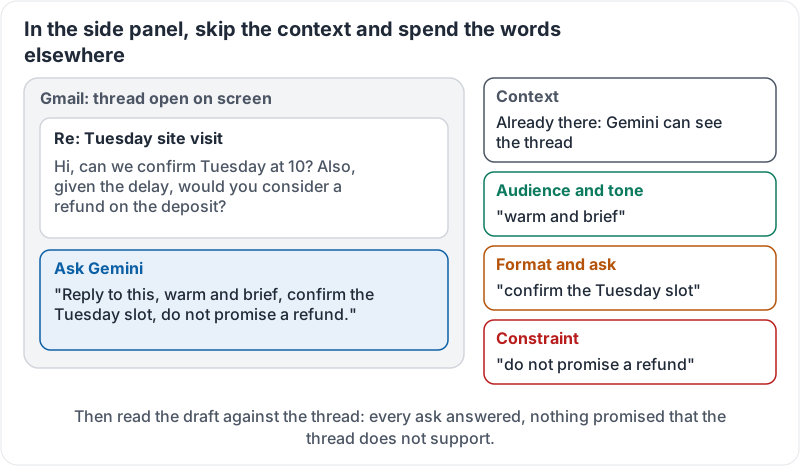
Inside Gmail or Docs you usually skip the context part, because Gemini can already see the email or document. Spend those words on audience, format and constraints instead: “Reply to this, warm and brief, confirm the Tuesday slot, do not promise a refund.”
The same prompt in the Gmail side panel, with each part labelled:
One change per follow-up
The first answer starts a conversation. Good follow-ups:
- “Shorter. Cut the second paragraph.”
- “You assumed we deliver. We don’t. Redo for collection.”
- “Three versions of the opening line.”
- “Put the date in the first sentence.”
Change one thing at a time so you can tell what fixed it.
Before and after
Before: “Write a job ad for a receptionist.”
After: “You are hiring for a 3-dentist practice. Write a job ad for a front-desk receptionist. Audience: people from retail or hospitality who have never worked in healthcare. Tone: friendly, honest about the pace. Format: short intro, 5 bullet responsibilities, 4 bullet requirements, one line on pay which I will fill in, and how to apply. Match the voice of this earlier ad: …”
Ninety seconds of typing saves twenty minutes of editing.
Google Workspace’s three-minute guide to prompting covers the same ground with its own examples:
Try it now
Pick a real message you need to send this week. Write the prompt with all four parts and one “do not invent” constraint, in the Gemini app or the Gmail side panel. Compare the result with a one-line prompt.
Remember: context, audience, format, example, plus what it must not invent. In the side panel, skip context and spend the words on the rest. When the answer is wrong, add information instead of asking again.
Checking your progress…