Agents, and when to supervise them
An agent does not just answer, it acts. The more it can change, the closer you watch.
From answering to doing
Most of this course is about Claude answering questions. An agent is different: it takes actions for you. It can click through websites, fill in forms, open files, move things between apps and finish multi-step jobs while you do something else.
Claude offers agents in two main shapes:
- Claude in Chrome: a browser extension that can browse, read pages, fill forms and complete tasks on websites you are signed in to.
- Cowork: Claude works through longer tasks with your files and apps, reporting back as it goes. You can start, steer and review a task on the web, in the desktop app or on your phone.
Both are powerful. Both make mistakes. The question for every task is not “can the agent do this?” but “what happens if it does this wrong?”
The three-zone rule
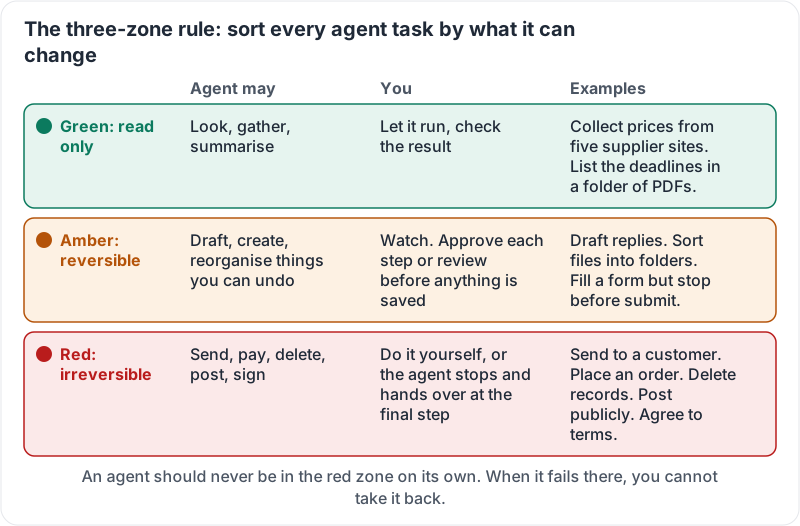
Sort every agent task by what it can change.
| Zone | What the agent can do | What you do | Examples |
|---|---|---|---|
| Green: read only | Look, gather, summarise | Let it run, check the result | Collect prices from five supplier sites; read a folder of PDFs and list the deadlines |
| Amber: reversible changes | Draft, create, reorganise things you can undo | Watch, approve each step or review before anything is saved | Draft replies in your inbox; rename and sort files into folders; fill a form but stop before submit |
| Red: irreversible or external | Send, pay, delete, post, sign | Do it yourself, or have the agent stop and hand over at the final step | Send an email to a customer; place an order; delete records; post to social media; agree to terms |
An agent should never be in the red zone on its own. Not because it will always fail, but because when it fails you cannot take it back.
The three zones at a glance:
What goes wrong
Agents fail in ways that look like success:
- Wrong target. It fills the form perfectly, on the wrong customer’s record.
- Confident guess. A field it cannot find gets a plausible value instead of a question.
- Scope creep. Asked to tidy one folder, it tidies three.
- Instructions on the page. A website can contain hidden text telling an AI to do something. Good agents resist this; none are perfect. This is a reason to keep agents away from payments and credentials.
How to brief an agent
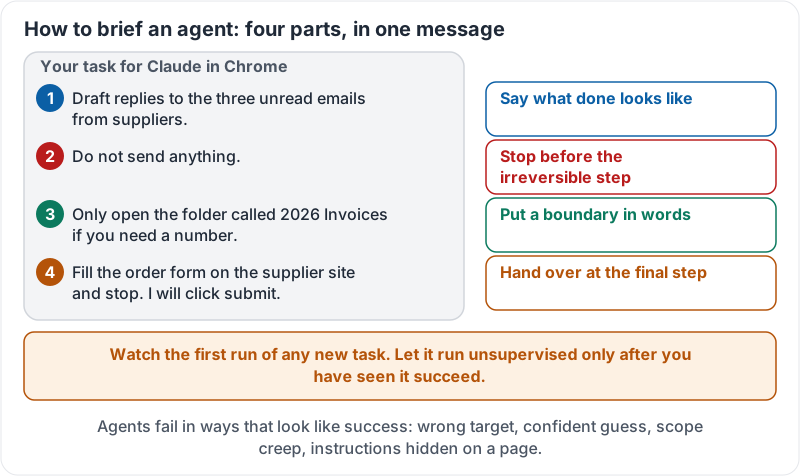
- Say exactly what done looks like. “Draft replies to the three unread emails from suppliers, do not send.”
- Put a boundary in words. “Only touch the folder called 2026 Invoices.”
- Ask it to stop before the irreversible step. “Fill the order form and stop. I will click submit.”
- Watch the first run of any new task. Let it run unsupervised only after you have seen it succeed.
A brief that has all four parts in it:
Anthropic’s demonstration of Claude for Chrome working through tasks in a browser. Notice which steps you would put in each zone:
And the equivalent for Cowork on the desktop:
Try it now
Write down the next three tasks you would like an agent to do. Put each in a zone: green, amber or red. For any red task, rewrite it so the agent stops at the final step and hands over to you.
Remember: read-only tasks can run alone, reversible tasks need a watcher, irreversible tasks stay with a person. Watch the first run of anything new.
Checking your progress…