Files, projects and memory
Upload the real document instead of describing it, keep repeat work in a project, and manage what ChatGPT remembers about you.
Upload the source
ChatGPT can read PDFs, Word documents, spreadsheets, images and more. The rule is simple: give it the actual file, not your description of the file. A pasted summary of your price list loses detail. The real price list does not.
Good uses of uploads:
- “Here is the supplier contract. List every date and deadline in it.”
- “Here is last month’s sales spreadsheet. Which three products fell the most?”
- “Here is a photo of the whiteboard from our planning meeting. Turn it into a task list.”
Two cautions before any upload. First, check what is in the file; a spreadsheet of customers has personal data and lesson 8 explains what to remove. Second, keep files current: an old price list produces old quotes with total confidence.
Ask it to point at the page
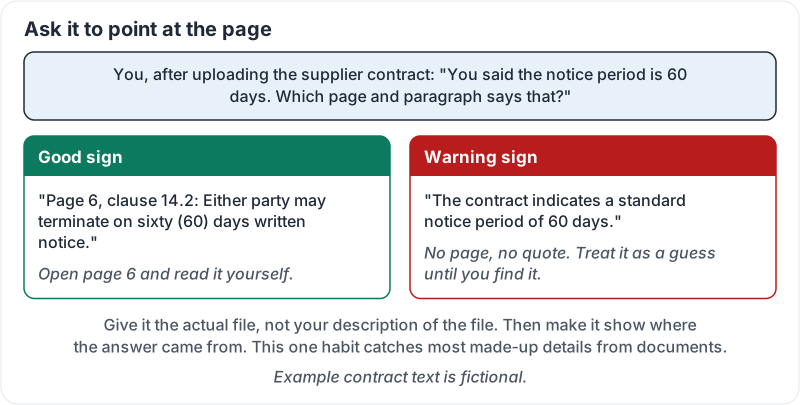
When ChatGPT answers from a file, ask where the answer came from: “Which page and paragraph says that?” If it cannot point at the text, the answer may be a guess. This one habit catches most made-up details from documents.
What a good answer and a warning sign look like:
Projects for repeat work
A project is a folder that holds instructions and files and keeps related chats together. Every chat you start inside it already knows the instructions and can read the files.
| Put it in… | When | Examples |
|---|---|---|
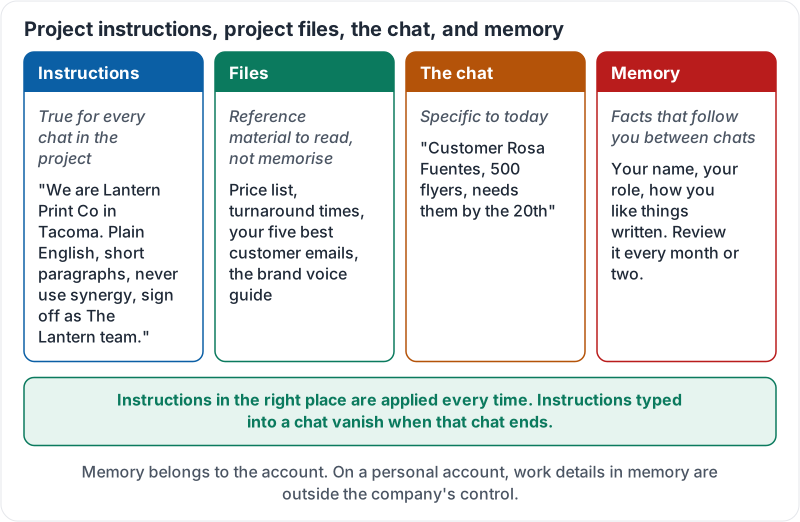
| Project instructions | True for every chat in the project | “We are Lantern Print Co in Tacoma. Plain English, short paragraphs, never use ‘synergy’, sign off as ‘The Lantern team’.” |
| Project files | Reference material to read, not to memorise | Price list, turnaround times, your five best customer emails, the brand voice guide |
| The chat | Specific to today | “Customer Rosa Fuentes, 500 flyers, needs them by the 20th” |
Instructions in the right place are applied every time. Instructions typed into a chat vanish when that chat ends.
The four homes for information:
Memory
Memory lets ChatGPT carry facts between chats: your name, your role, how you like things written. It can also draw on your past chats to tailor answers.
Useful, and worth managing:
- Review it every month or two. Delete anything stale, and anything about other people.
- Memory belongs to the account. On a personal account, work details in memory are outside the company’s control.
- Use a temporary chat when you want a one-off that leaves nothing behind.
A walkthrough of projects in use, from a well-known software educator:
A worked example
Noor handles quotes at a print shop. She made one project, “Quotes”, with instructions about tone and sign-off, and uploaded the price list and turnaround sheet. Now “Rosa Fuentes, 500 A5 flyers, double-sided, needs them by the 20th” produces a correct quote in the right voice. She still checks the numbers (lesson 7), but she no longer types the background.
Try it now
Create a project for the task you repeat most. Write three sentences of instructions and upload one file. Start a chat inside it and give a one-line request. Then ask ChatGPT which part of the file it used.
Remember: upload the source, keep repeat work in a project, ask it to point at the page, and review memory every couple of months.
Checking your progress…