Free, paid and workspace plans, and the data controls behind them
The plan you are on decides who can see your chats and whether they train the model. Know which one you are in before you paste anything from work.
Three kinds of ChatGPT
ChatGPT comes in three broad shapes. The tier names and prices change often, so this lesson describes what each kind means for your work rather than what it is called this month.
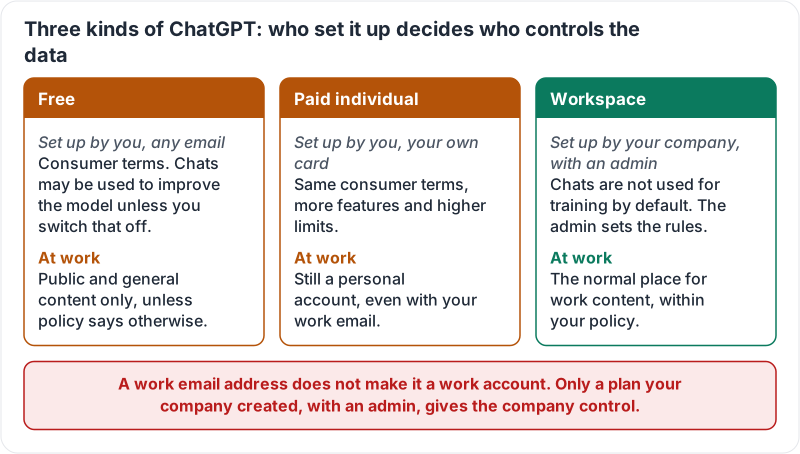
| Kind | Who set it up | Who controls the data | What that means at work |
|---|---|---|---|
| Free | You, with any email | You, under consumer terms; chats may be used to improve the model unless you switch that off | Public and general content only, unless your policy says otherwise |
| Paid individual | You, with your own card | Same consumer terms with more features and higher limits | Still a personal account, even if you used your work email |
| Workspace (business or enterprise) | Your company, with an admin | Your company; chats are not used for training by default and the admin sets the rules | The normal place for work content, within your policy |
The single most common mistake: assuming that a work email address makes it a work account. It does not. Only a plan your company created, with an admin who can see the settings, gives the company control.
The three kinds side by side:
The data controls
On free and paid individual accounts there is a setting that decides whether your chats may be used to improve the model. There is also a way to start a temporary chat that is not saved to history or memory.
On workspace plans the admin controls these settings. Chats are not used for training by default, and the admin may be able to see usage.
Three habits:
- Know the state of the training switch on any personal account you use for anything work-adjacent.
- Use a temporary chat for one-off questions you do not want kept.
- Prefer the workspace account for anything involving company or customer information, and use it only for work.
Switching between accounts
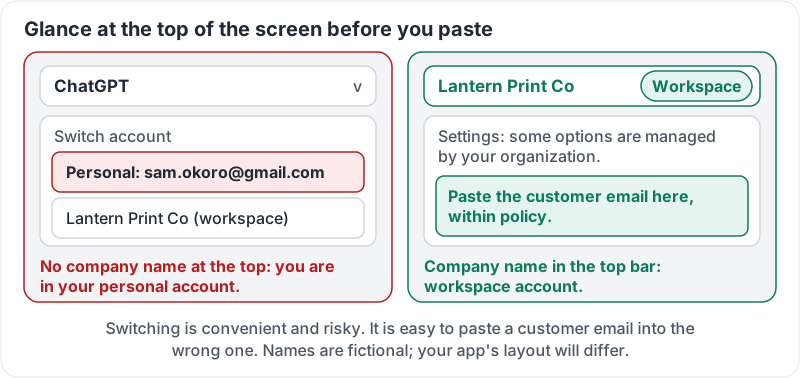
Many people have both a personal ChatGPT and a company workspace. The app lets you switch. This is convenient and risky: it is easy to paste a customer email into the wrong one.
Before pasting anything from work, glance at the top of the screen. If you cannot see the company name or workspace indicator, you are probably in your personal account. Switch first.
What the glance is looking for:
Try it now
Open ChatGPT on your phone. Find the plan name, the email, and the training setting. If you have a company workspace, practise switching to it and note what on screen tells you which account you are in.
Remember: a work email does not make a work account. Check the plan and the data controls once, know how to spot the workspace on screen, and paste work content only there.
Checking your progress…