Sort and filter without scrambling rows
Sorting one column by itself tears the rows apart. Use a filter on the whole table and the rows stay together.
The mistake everyone makes once
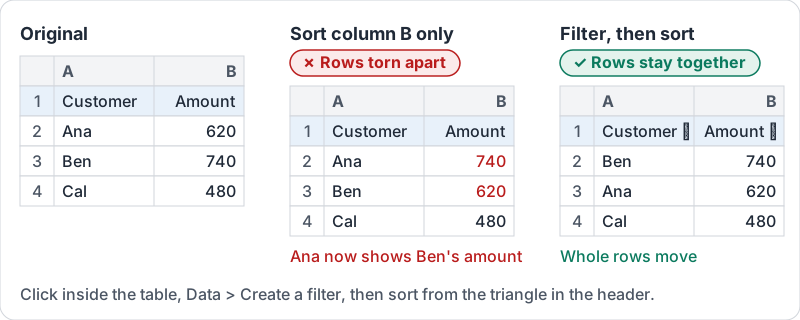
You select column D (Amount), sort it largest to smallest, and now every amount sits next to the wrong customer. Sheets did exactly what you asked: it sorted only the cells you selected. Undo immediately if this happens; version history (the same safety net as in Docs) can rescue it later if you did not notice.
The fix is to sort the whole table, never one column. The safest way is to not select anything and let a filter do it.
What goes wrong, and what the filter does instead.
Four tools that look alike
| Tool | What it does | When to use it |
|---|---|---|
| Sort sheet | Reorders every row in the sheet by one column | Quick, when the sheet is a single clean table |
| Sort range | Reorders only the selected cells | Rarely; only if you have selected every column of the table |
| Filter | Adds dropdowns to the header row; sort or hide rows from there | Most of the time |
| Filter view | A filter only you see, saved with a name | Shared sheets, so you do not hide rows from colleagues |
A filter is the everyday tool. Once it is on, each header cell gets a small triangle. From it you can sort A to Z or Z to A (rows stay together), hide rows by value, or show only rows matching a condition such as greater than 500.
Shared sheets: use filter views
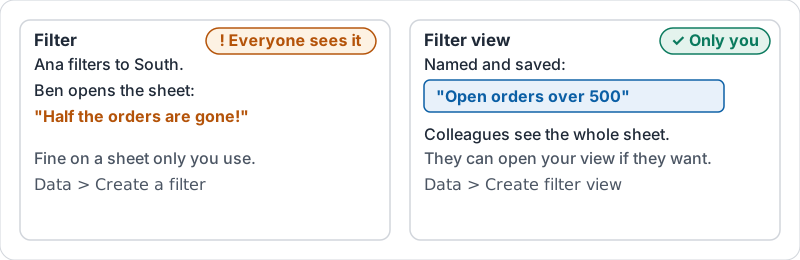
A plain filter changes what everyone sees. If Ana filters to the South region, Ben opens the sheet and thinks half the orders vanished. On a shared sheet, create a filter view instead. It applies only to you, it can be named (“Open orders over 500”) and reused, and colleagues can open it too if they want.
Filter or filter view.
Sorting more than one way
To sort by Region and then by Amount within each region, use the sort dialog on the whole range with a header row and add a second sort column. Do not sort twice in a row; the second sort undoes the first.
Try it now
On a copy of a real sheet, turn on a filter from a cell inside the data. Sort by the amount column from largest to smallest and check that two rows still show the right customer next to the right amount. Then create a filter view that shows only one region and close it.
Remember: never sort a single selected column. Click inside the table, turn on a filter, and sort from the header.
Checking your progress…