Lab: fix an over-shared folder
Read a sharing panel like an auditor, fix each entry, and leave a note so the owner knows what changed and why.
The situation
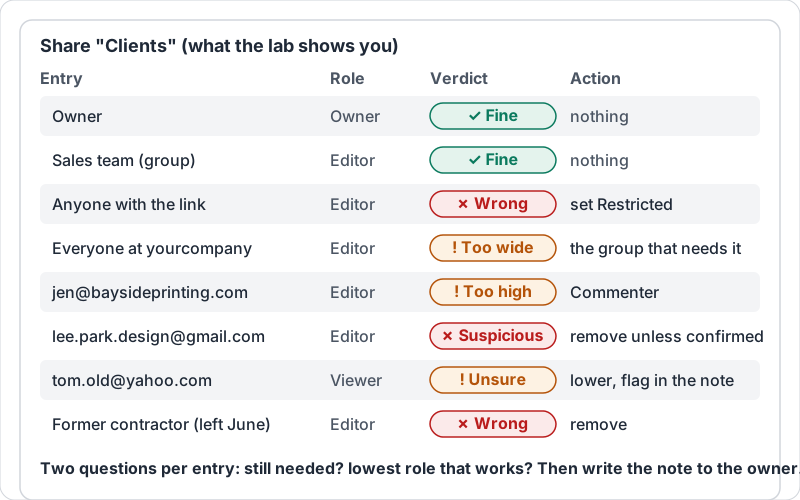
The owner asks you to “check the sharing on the Clients folder, something feels off”. You open the sharing panel and see nine entries. Some are fine. Some are not. You need to fix the ones that are wrong without breaking anyone’s work, and tell the owner what you did.
Reading the panel
Go entry by entry and ask two questions: does this person or setting still need access, and is the role the lowest that does the job?
| What you see | Verdict | Action |
|---|---|---|
| Owner or the shared drive itself | Fine | Nothing |
| A team group as Editor on the team’s own folder | Fine | Nothing |
| “Anyone with the link” on anything not public | Wrong | Set General access to Restricted |
| “Everyone at yourcompany” as Editor on HR or Finance | Too wide | Restrict to the group that needs it, as Viewer where possible |
| A client or vendor as Editor | Too high | Commenter or Viewer |
| A personal email address (gmail, outlook, yahoo) | Suspicious | Remove unless the owner confirms it is current |
| A former employee or contractor | Wrong | Remove |
Do not remove the owner, and do not remove people doing current work without asking. If in doubt about one entry, lower it to Viewer and flag it in your note rather than removing it.
A panel like the one the lab shows, with a verdict and action for each entry.
Documenting what changed
Changes to sharing are invisible to everyone except the people who lose access, who tend to notice at the worst moment. Write a short note to the owner, and keep a copy in the folder’s own records or the team chat:
- Which folder, and when.
- Each entry you changed: who or what, from which role to which, and why in a few words.
- Anything you left alone but are unsure about.
Example: “Clients folder, 5 Nov. Set General access from Anyone with the link (Editor) to Restricted; the folder holds signed contracts. Removed lee.park.design@gmail.com (contractor finished in June). Changed jen@baysideprinting.com from Editor to Commenter; she reviews proposals but should not edit them. Left Sales team group as Editor. Not sure about tom.old@yahoo.com, lowered to Viewer, please confirm.”
What the assessment asks
The lab items show a simulated sharing panel: a list of names with their access, such as “Anyone with the link · Editor”. You tap the entry that is wrong, or the one that should be removed, or the one whose role is too high. The final item shows a folder’s sharing and asks you to write the note to the owner in two to four sentences.
Try it now
Pick the one folder in your team’s Drive that holds the most sensitive material. Review its sharing panel against the table above, make the fixes, and send the owner your note in the format shown.
Remember: restricted by default, lowest role that works, personal addresses out, and write down what you changed.
Checking your progress…