Offline access
Mark the files you need before you lose signal, never on a shared computer, and let them sync when you are back.
How offline works
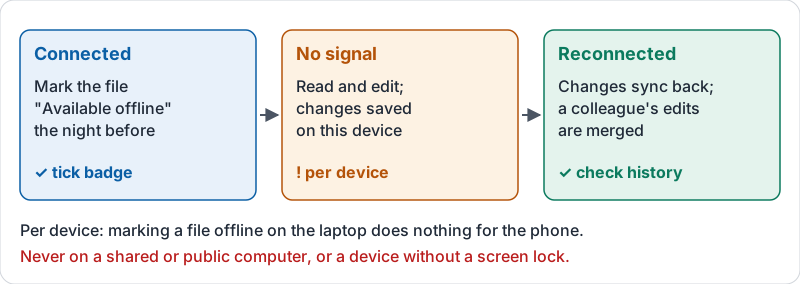
Drive keeps files in the cloud and shows you a view of them. With no connection you can see the list but open nothing, unless the file has been made available offline. Then a copy sits on your device, you can read and edit it, and your changes sync back when you reconnect.
Two things people get wrong:
- It is not automatic for everything. You choose the files or folders, while you still have a connection. Recently opened Docs, Sheets and Slides may be cached, but do not rely on it.
- It is per device. Marking a file offline on your laptop does nothing for your phone.
The three stages, from marking a file to syncing it back.
Before you lose signal
| Situation | Do this the night before |
|---|---|
| Flight or train with a doc to edit | Mark that doc available offline on the laptop |
| Site visit with no signal and five PDFs to read | Mark those five files offline on the phone, not the whole drive |
| A week at a venue with poor Wi-Fi | Mark the event folder offline; check storage space first |
Marking a whole shared drive offline fills the device and takes hours. Pick what you need.
What happens when you edit offline
Docs, Sheets and Slides edits made offline are saved on the device and sync when you reconnect. If a colleague edited the same document while you were away, both sets of changes are merged; it is worth reading the document and version history afterwards to check nothing collided. Other file types (PDFs, images) are read-only offline unless you use another app.
Where not to use it
Offline access leaves copies of your files on the device. Never turn it on for a shared or public computer, a family laptop, or a device without a screen lock. If a device is lost, tell your administrator so the account can be signed out remotely.
Try it now
On your phone, mark one document available offline. Turn on airplane mode, open it, add a word, then turn airplane mode off and confirm the word appears when you open the document on another device.
Remember: choose the files, mark them while connected, on your own locked device. Everything syncs back when you are.
Checking your progress…