Comments and action items
A comment asks a question or assigns a task without touching the text. Resolve it when it is done, never delete it.
Comment or edit?
Before you change someone else’s document, ask: is this my call?
| You want to | Do this |
|---|---|
| Ask why something is written that way | Comment |
| Point out a fact that needs checking | Comment, and @-mention the person who knows |
| Fix a typo in a doc you co-own | Edit directly |
| Rewrite a paragraph in someone else’s doc | Suggest (lesson 5) |
| Hand a task to a specific person | Comment and assign it |
Comments live beside the text. They do not change it, and they survive until someone resolves them.
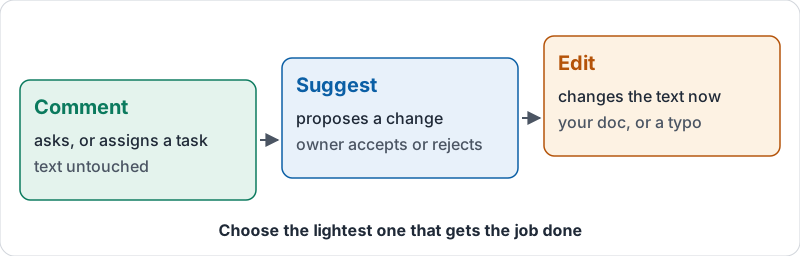
Three tools, from lightest to heaviest.
Writing a useful comment
A comment is read by a busy person on a phone. Make it easy to act on:
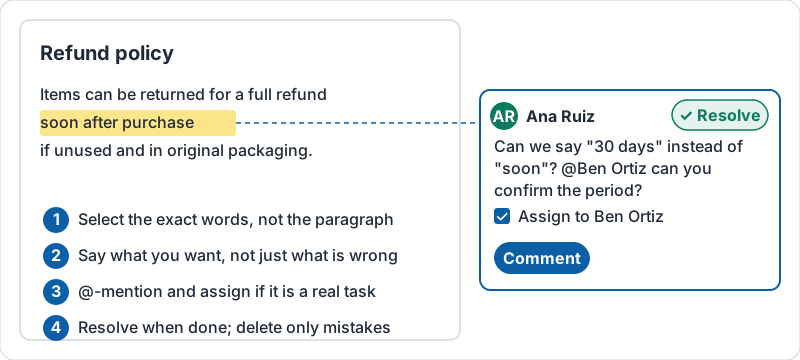
- Select the exact words the comment is about, not the whole paragraph.
- Say what you want, not just what is wrong. “Can we say 30 days instead of ‘soon’?” beats “vague”.
- Mention a person with @ and their name when you need them specifically. They get a notification and the comment appears in their task list.
- One topic per comment. Two questions in one comment get one answer.
A comment that is easy to act on looks like this.
Assigning action items
When you @-mention someone, Docs offers to assign the comment to them. An assigned comment is a task: it shows up for that person until they mark it done. Use this for “please add the pricing” or “confirm this date”, and nothing else; assigning a vague remark just creates noise.
Resolve, do not delete
When a comment has been dealt with, resolve it. The comment disappears from the margin but stays in the comment history, so anyone can later see why a change was made. Deleting a comment removes that record. Only delete something posted by mistake.
Try it now
Open a shared document. Select one specific phrase and add a comment that asks a clear question, mentioning the person who can answer. If it is a real task, assign it. Later, when the question is answered, resolve the comment rather than deleting it.
Remember: comments ask, suggestions propose, edits decide. Choose the lightest one that gets the job done.
Checking your progress…