NotebookLM for source-grounded answers
NotebookLM answers only from the documents you give it and shows you where each sentence came from. Learn to use it, and to check the citations anyway.
A different kind of tool
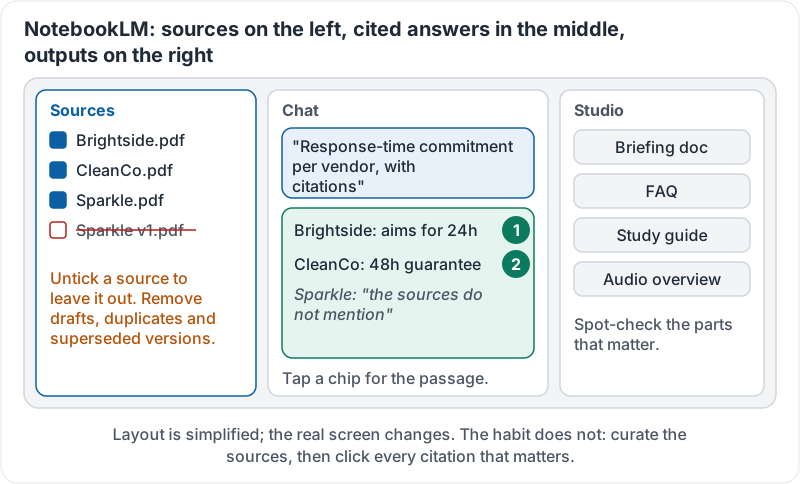
Gemini draws on everything it learned plus whatever you give it. NotebookLM is deliberately narrower: you load a set of sources, documents, PDFs, slides, web pages, and it answers questions only from those sources, with a numbered citation on each claim that you can click to see the exact passage.
That makes it the right tool when the question is “what do our documents say?” rather than “what is generally true?”:
- “What are the cancellation terms across these five supplier contracts?”
- “Summarise the three safety audits and list every open action.”
- “What did the board minutes decide about the new location?”
Why grounding helps and does not solve everything
Because NotebookLM is limited to your sources, it hallucinates far less than an open chat. It will usually say “the sources do not mention that” rather than guessing. But two failure modes remain:
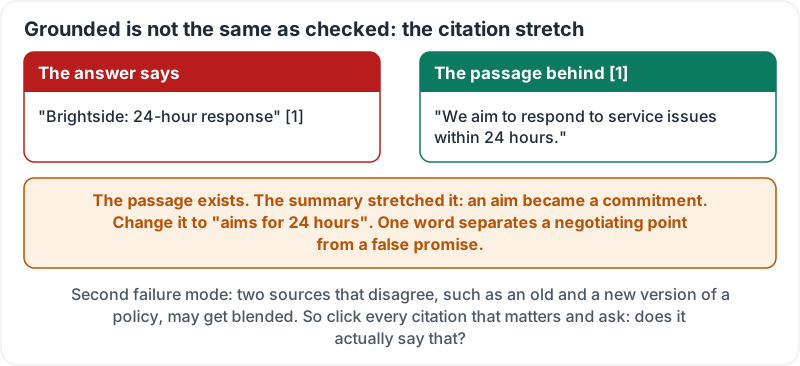
- A citation that does not say what the summary says. The passage exists, but the summary stretched it: an “aim” became a “guarantee”, a “proposal” became a “decision”.
- Two sources that disagree. An older and newer version of a policy both loaded; the answer may blend them.
So the habit is: click every citation that matters. Read the highlighted passage. Ask: does it actually say that?
The stretch, caught by one click:
Building a notebook
- Create a notebook for one question or project, not for everything.
- Add sources. Pick files from Drive, upload PDFs, paste text or links. Fewer, better sources beat a dump of everything.
- Check the source list. Remove drafts, duplicates and superseded versions. This is where most “wrong answer” problems are prevented.
- Ask. Start with “summarise each source in two lines” to see what it understood.
- Click citations. For any point that would change a decision, read the passage.
Beyond questions
NotebookLM can also produce study guides, FAQs, briefing documents and audio overviews from the sources. These are useful for onboarding a new colleague onto a project or turning a pile of PDFs into something readable on the bus. Treat them like any summary: spot-check the parts that matter against the source.
The three panels, simplified:
Google Workspace’s introduction shows a notebook being built and questioned:
A worked example
Omar needs to brief the owner on five cleaning-contract proposals. He makes a notebook, adds the five PDFs, and asks: “For each proposal, list monthly cost, response-time commitment, notice period and anything unusual, with citations.” The table comes back in a minute. He clicks the response-time citation for one vendor and finds the PDF says “we aim for 24 hours”; the table said “24-hour response”. He changes it to “aims for 24 hours”. That one word is the difference between a negotiating point and a false promise to the owner.
Try it now
Create a notebook with three real documents from one project. Ask for a two-line summary of each, then ask a question whose answer would matter. Click every citation in the answer and confirm each passage says what the answer says.
Remember: NotebookLM answers from your sources only and shows you where. Curate the sources, then click every citation that matters. Grounded is not the same as checked.
Checking your progress…