Phishing today: AI-written messages, voice clones and deepfakes
Bad spelling used to give phishing away. AI removed that tell. Learn the signals that still work when the message, the voice and even the face look right.
The old tells are gone
For twenty years we taught people to look for typos, odd grammar and generic greetings. AI writing tools have erased those signs. A phishing email today can be perfectly written, mention your actual vendor, reference a real project from your website or LinkedIn, and match your boss’s tone.
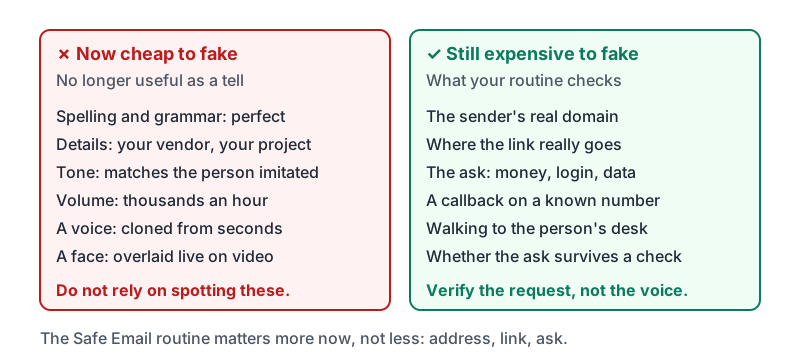
The good news: the things that cannot be faked cheaply have not changed. The sender’s real domain, the link’s real destination, and whether the request makes sense when you verify it through a channel you already have.
What AI changed and what it did not
| Signal | Before AI | Now |
|---|---|---|
| Spelling and grammar | Often poor | Perfect. Useless as a tell. |
| Personal details | Generic (“Dear customer”) | Your name, your vendor, your project, scraped from public sources |
| Tone | Stiff or odd | Matches the person being imitated |
| Volume | A few targeted attempts | Thousands of personalized messages per hour |
| The sender’s domain | Fake | Still fake, or a compromised real account |
| Where the link goes | Fake | Still fake |
| The request itself | Money, login, data, urgency | Still money, login, data, urgency |
So the routine from the Safe Email course is more important, not less: read the address, reveal the link, question the ask.
The table in two columns: what is now cheap to fake, and what still is not.
Voice clones
A few seconds of someone’s voice, from a voicemail greeting, a podcast, a social media video or a company promo, is enough to clone it. Criminals use cloned voices for:
- a “boss” calling an employee to approve an urgent payment or gift-card purchase,
- a “family member” calling in distress asking for money,
- a “bank” or “IT” caller who sounds like a real person you have spoken to before.
The voice will sound right. It may answer simple questions. The voice is no longer proof of identity. What still works is the channel: hang up and call the person back on the number you already have. A real boss will not mind. A clone cannot pick up that phone.
Two more habits:
- Agree with your team on a simple verification phrase or a rule such as “payment requests by phone are always confirmed by a call back.” Keep it boring and consistent.
- Be suspicious of any caller who says do not call me back on my usual number, “my phone is broken, use this one”, or “I’m boarding a flight”.
Deepfake video
Video calls can now be faked in real time: a face and voice overlaid on a scammer. Reported cases involve finance staff joining a video meeting with what looked like their CFO and several colleagues, all fake, and wiring money on instruction.
How to treat a video call that asks for money, access or data:
- Treat it exactly like an email asking for the same thing. The medium does not change the rule.
- Say you will confirm and call back. Then call the person on a number you already have, or walk to their office.
- Watch for pressure to act during the call. Genuine requests survive a ten-minute delay.
- Odd signs can help but are not reliable: lip-sync slightly off, unusual lighting, the person refusing to turn their head or wave a hand. Do not rely on spotting these. Rely on the callback.
Phishing by text and QR code
Text messages (smishing) carry the same tricks with less room to inspect: “Your package is held”, “Toll unpaid”, “Your bank flagged a charge”, “This is your manager, I changed numbers.” QR codes on posters, parking meters and in emails hide the destination entirely. The rule is the same: do not use the link or code to log in or pay. Open the app or site yourself.
The verify-by-known-channel rule, restated
| Request arrives by | Verify by |
|---|---|
| Phone call to a number you already have, or walk over | |
| Text | Phone call to the number already in your contacts, not a reply to the text |
| Phone call | Hang up, call back on the known number |
| Voicemail | Call back on the known number, not the one in the message |
| Video call | End the call, call back on the known number |
| Chat message | A different channel, such as a phone call or in person |
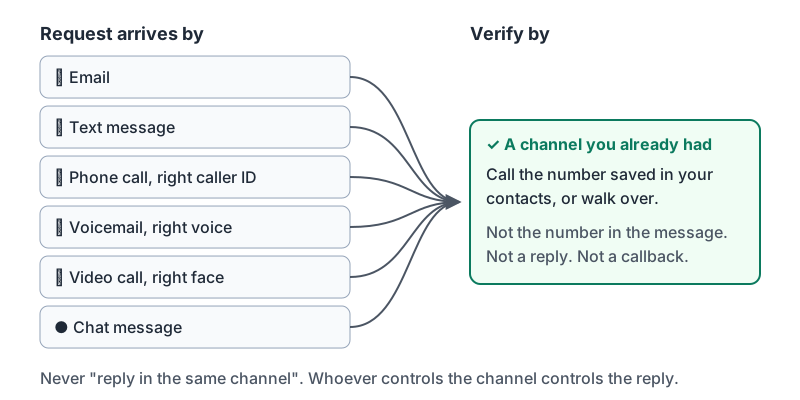
Notice that the answer is never “reply in the same channel”. Whoever controls the channel controls the reply.
Six ways a request can arrive, one way to verify it.
Try it now
Think of the three people whose voice or email could convince you to move money or share data. For each one, find the phone number you would use to call them back and make sure it is saved in your contacts under their name. That is your defense against a cloned voice.
Remember: AI made the message, the voice and the face cheap to fake. The real domain, the real link destination and a callback on a number you already had are still expensive to fake. Verify the request, not the voice.
Checking your progress…